Features Products History Photography Support Connectivity System Contact Us


 FEATURES

PatientGallery has everything you need to bring digital imaging into your Dental Practice. Expand your Practice Management System with access to the most sophisticated digital imaging technology available. PatientGallery integrates images from many diverse sources into one robust database.


  • Capture images from digital cameras, x-ray sensors, intra-oral cameras and desktop scanners.

  • Display, print and email images from any computer in your office.

  • Create dynamic case presentations, customizable slide show scripts and display templates.

  • Enhance your diagnostic capabilities with x-ray analysis tools designed to make the most out if your digital and film based equipment.

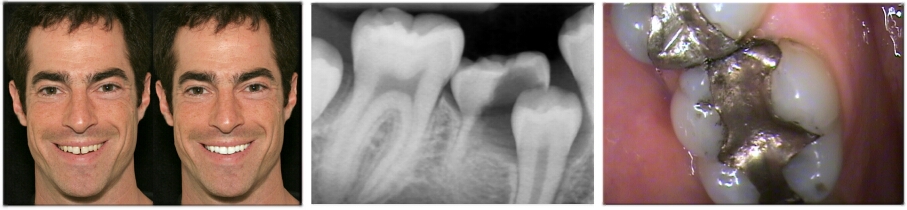
  • Create cosmetic simulations with a wide array of image editing tools designed to easily integrate your digital photography with the Lorin Library PGD.

  • Import and export functions allow you to easily share images with other applications.

  • PatientGallery Bridge links your imaging system to many popular Practice Management Systems.

  • Go paperless with PatientGallery's document handling tools.

  • Share images between offices with PatientGallery’s synchronization tools.


PRODUCTS

PatientGallery may be purchased in different configurations to accommodate your needs. You can start with PatientGallery BASIC and add modules and workstations as your practice grows.

All of the products listed are provided in single user, stand-alone configuration. PatientGallery MULTI-USER allows you to access images from any computer in your office using standard Windows peer-to-peer networking.


PatientGallery BASIC

Basic image database, practice management bridge, support for digital cameras, intra-oral cameras, scanners and other DirectX or TWAIN compatible devices, case presentations, printing, email support, image editing, enhancement and annotation.


PatientGallery DESIGNER 

PatientGallery BASIC plus the cosmetic simulation module and Lorin Library PGD. DESIGNER includes bleaching, color matching, blending, smile warping and replacement, veneer and smile library management.


PatientGallery XRAY     

PatientGallery BASIC plus the x-ray analysis module. XRAY provides direct capture from most digital x-ray sensors and scanners, automatic template loading and labeling, a variety of x-ray examination and enhancement tools and a flatbed scanner interface which automatically sorts x-ray films into individual image files.


PatientGallery COMPLETE

PatientGallery COMPLETE combines BASIC, DESIGNER and XRAY in one package.  All of the features of PatientGallery are available throughout your practice..


PatientGallery BRIDGE

Links PatientGallery to many popular Practice Management Systems and is provided with all product configurations at no additional cost. With PatientGallery BRIDGE, you can open a patient’s chart in your Practice Management System and access all of their images with one mouse click.


Lorin Library PGD

Dentists who are experienced with cosmetic treatment know that the subtleties of smile design can make the difference between success and failure.  The dentist must decide a host of factors including midline, cant, incisal edge position and shape, golden proportion, and color.  All these factors are defined by the rules of esthetics, except incisal edge shape.  Shape is largely up to personal preference.  Until today dentists and labs have had to guess at what shape the patient may prefer. The Lorin Library was created so the lab, doctor and patient can define the preferred esthetic smile design prior to beginning treatment.

 Smile Style Guide and Digital Smile Designs CD


Digident.com - 8190 Royal Palm Blvd., Suite 205, Coral Springs, Florida 33065 - (800) 741-7966


HISTORY

Raster Builders was founded in 1991 to develop imaging products in parallel with Canon USA's emerging still video imaging technology.  In addition to products bundled with the Canon equipment, Raster Builders developed several specialized imaging applications:

  • An Electronic Briefing System for Joint Special Operations Command (JSOC) Fort Bragg, NC.

  • A Planogram Digitizing System for retail merchandising companies including Target, Wal-Mart and Rite Aid.

  • A Dental Imaging System originally released under the trade name InfoSource® to Source One Dental, BC, Canada.

InfoSource was licensed to SciCan Inc. in 1995 and released under the trade name ImageFX®. ImageFX continued to grow in industry support and capability until 2006.

The product was re-released in 2006 under the name PatientGallery® as a collaborative effort between Raster Builders and CompuDent Systems Inc. which provided technical support for ImageFX.

Major changes to the product:

  • PatientGallery received FDA approval as a Class II PACS device. The 510(K) application was reviewed by Underwriters Laboratories, Inc (UL).

  • Patent rights were negotiated to  incorporate x-ray mounts or templates.

  • The Lorin Library and Smile Style Guide was included with the Designer Module.

  •  Many new x-ray and intra-oral camera devices were added.

  • A formal support structure was put in place to provide 800 telephone service,  software upgrades and web-based training.

  • A simple upgrade path was created for existing ImageFX installations.

PatientGallery is still backward compatible with databases generated by InfoSource and ImageFX.


DIGITAL PHOTOGRAPHY

Digital photography training is available as part of the basic PatientGallery support program, regardless of the equipment you have and way you incorporate photography into your practice. PatientGallery provides simple tools for creating professional quality portraits and diagnostic images.   


 TRAINING, SUPPORT AND UPGRADES

When you purchase any configuration of PatientGallery, you will receive a one year support contract which includes web-based training for each module, telephone support and software upgrades. Web-based training is available at your convenience. All you need is broadband cable or DSL service and a telephone to bring our trainers and computer displays into your office.

Our experienced customer support representatives are available to answer your questions between 8 AM and 8 PM Eastern Time, Monday through Friday.


CONNECTIVITY

PatientGallery connects the widest range of Practice Management Systems, cameras, sensors and scanners in the industry. As your image database grows, we provide access to new products, building on the training and knowledge you have accumulated. In many cases, the software can be dynamically configured to connect to new products without a software upgrade.

 Intra-oral Cameras

  • Air Techniques Acclaim USB Camera
  • Claris USB Camera
  • Digital Doc USB Camera
  • DocPort Macro
  • eMPIA Generic USB Push-Button
  • Gendex AcuCam Concept IV FWT
  • Gendex eZ1 USB2 Camera
  • Schick USBCam
  • SciCan's Ultimate LED Camera
  • Sopro USB Camera
  • Win-100D USB Camera

 X-ray Sensors and Scanners

  • Air Techniques ScanX
  • Dent-X EVA Sensors
  • Gendex-Kavo GxPicture
  • Instrumentarium
  • Lightyear Sensors
  • Optime Scanner
  • Owandy
  • Planmeca
  • Progeny
  • Schick CDR
  • Sirona SIDEXIS
  • Sordex Cranex D
  • Suni Sensors

 Standard Camera, Video and Scanner Interfaces

  • DirectX/Video For Windows
  • FlashBUS MV/Spectrim Video Adapters
  • Memory Card Readers
  • Twain Devices

Practice Management Systems

  • AbelDent
  • Ace Dental Software
  • Computer Age Dentist
  • Daisy
  • DentalExec
  • DentalVision
  • Dentech
  • Dentrix
  • DentiMax
  • Dental Office Xpress (DOX)
  • Doc-Aide
  • EagleSoft
  • Easy Dental
  • Exan Axium
  • First Pacific Corporation
  • Genesis
  • LiveDDM
  • Medims
  • Mogo
  • Oasys
  • OCS - Office Partner
  • OMSVision
  • Open Dental
  • Oral Surgery-Exec
  • Orthotrac Office
  • Perio-Exec
  • Perio-Vision
  • Power Practice
  • PracticeWorks
  • QSI
  • SoftDent
  • WinOMS


SYSTEM RECOMMENDATIONS

Operating System  Windows Server 2003, Windows 2000 SP4, Windows XP SP2, Windows Vista. (Windows Server is not required for network configurations).

Computer                 Pentium 4 or higher, 1 Gigahertz or higher, USB 2.0.

Memory                     1+ Gigabytes.

Disk Storage            250 Gigabytes + for server and standalone systems (based on size and number of images). 80 Gigabytes minimum for workstations.

Network                    100-Base T Peer-to-Peer configuration, 1 Gigabit recommended (Windows version will determine the number of workstations supported).

Backup                     Multiple, removable hard drives. Backup software should support uncompressed formats so data and images can be restored quickly.

Video Capture         USB 2.0 port for USB cameras. IntegralTech FlashBUS MV Lite or FlashBUS Spectrim Lite is recommended for S-Video and Composite Video cameras. Any DirectX-compatible video capture card can also be used. High-performance Display Adapter (VGA) and Pentium 4 or higher CPU for fast display.

Monitor                     17 inch LCD monitor or larger (DVI connection recommended). Dual monitor support requires special VGA adapter and additional monitor.

Foot Pedal                Game Port/DirectX USB compatible device or Mouse/keyboard emulation devices.

Digital Camera         USB 2.0 compatible Card Reader (recommended) or TWAIN-compliant direct connection.

Flatbed Scanner      TWAIN-compliant scanner. Transparency unit required for x-ray negatives and color slides.

X-ray Sensors          Refer to manufacturer’s specifications.


CONTACT US (800) 925-2134

Live PatientGallery demonstrations are available via high-speed internet. Please call between 9 AM and 5 PM Pacific Time, Monday through Friday, for more information.